Choose a discipline above or open one below. Each project starts with the way you actually use the space, system, or property.
01Home automation consulting+
Guidance on choosing and bringing together connected systems so they work reliably in daily life.
Project / Guest experience
Guest services, right from the TV remote
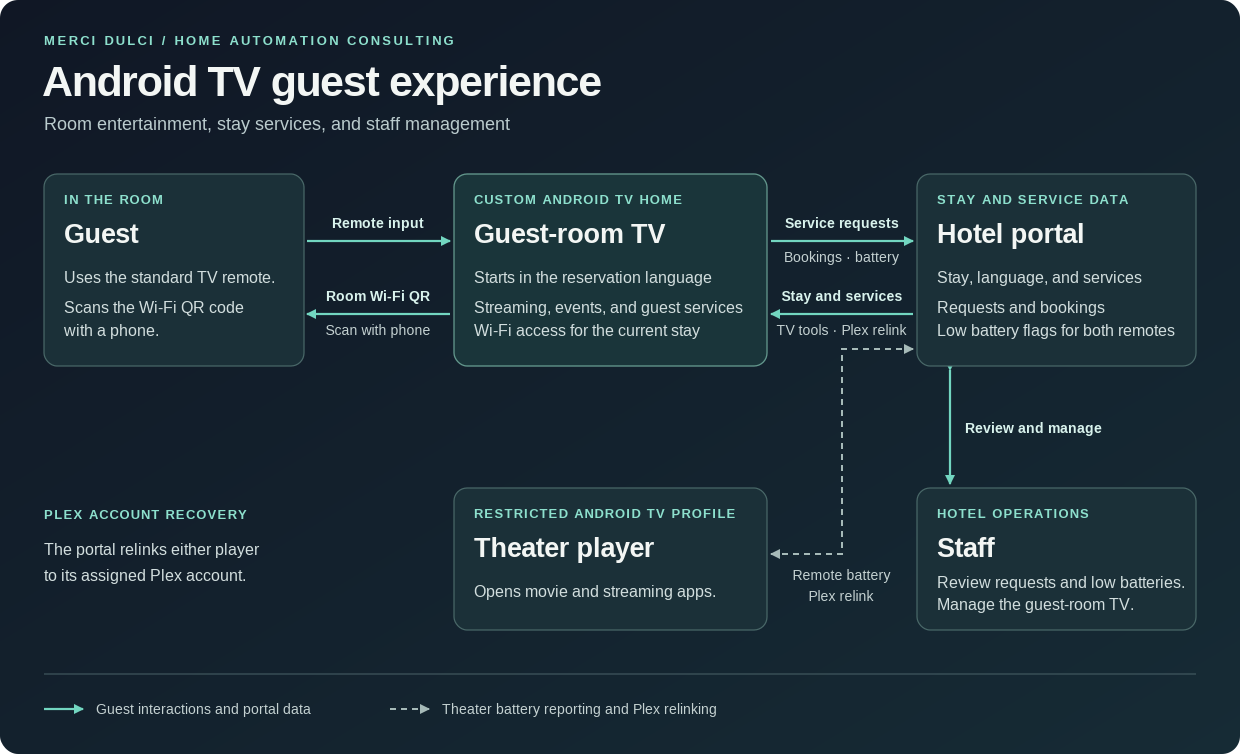
We built and installed a custom Android TV home screen for Merci Dulci. When a reservation includes a supported language, the TV starts in that language, and guests can switch it with the remote. From the same screen, they can join room Wi-Fi by QR code, browse local events, open streaming apps, request an airport transfer, or book theater time.
Staff use the hotel portal to review requests, manage the room TV app, and see low-battery flags for guest-room and theater remotes. If Plex is signed out on either player, opening it from the hotel home screen automatically relinks the assigned account and restores access to the shared movie library.
The guest uses the standard remote to navigate the custom Android TV home screen and can scan the room Wi-Fi QR code with a phone. The portal sends the reservation language, available services, and device management instructions to the room TV. A supported reservation language is selected automatically at the start of the stay. Guests can change that selection with the remote. The TV sends guest requests and bookings back to the portal. The theater player uses a separate media home screen. Both players report remote battery levels to the portal, where staff see low-battery flags. When Plex is opened on a signed-out player, the portal relinks that player to its assigned account so the shared library returns. Solid arrows show guest interactions and the room TV and staff exchanges with the portal. The dashed line shows theater battery reporting and Plex relinking.
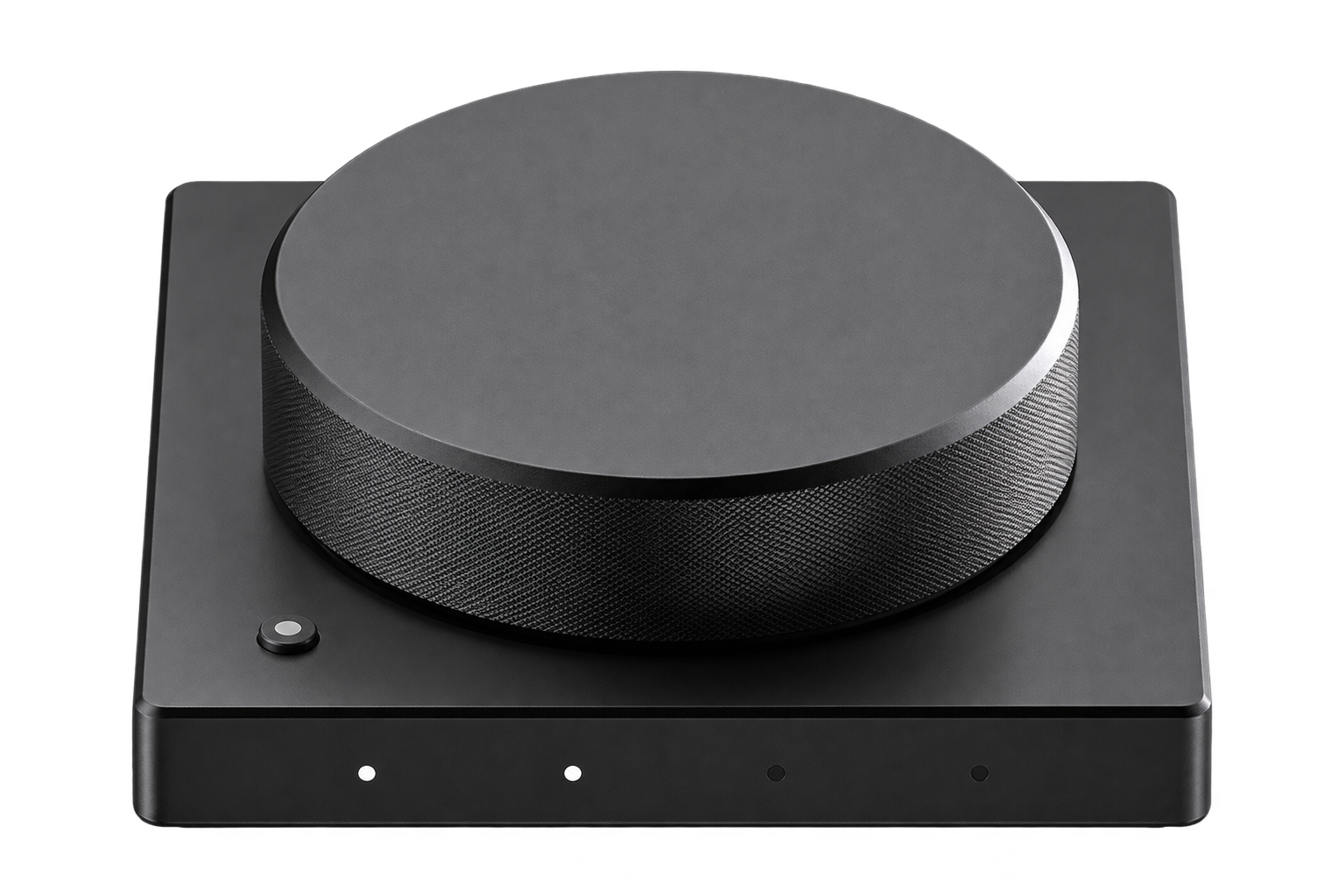
We built and installed a reception audio control at Merci Dulci around a Binepad KnobX1. Staff turn the knob to adjust PA volume and tap the center to pause Sonos or play the current source. The knob flashes red when music is paused or stopped and returns to its saved color during playback. Holding the center starts an announcement. The portal lowers the music while staff speak and restores it when they release the knob. The controls work from the badge waiting screen.
A separate mode button cycles through four Sonos Favorites. Custom Binepad firmware lights just the indicator for the selected preset, and the system waits about a second after the last press before playing it. The Reception workstation handles the knob and the USB microphone. The portal server sets the audio levels and feeds the PA through a Behringer UCA202 audio interface.
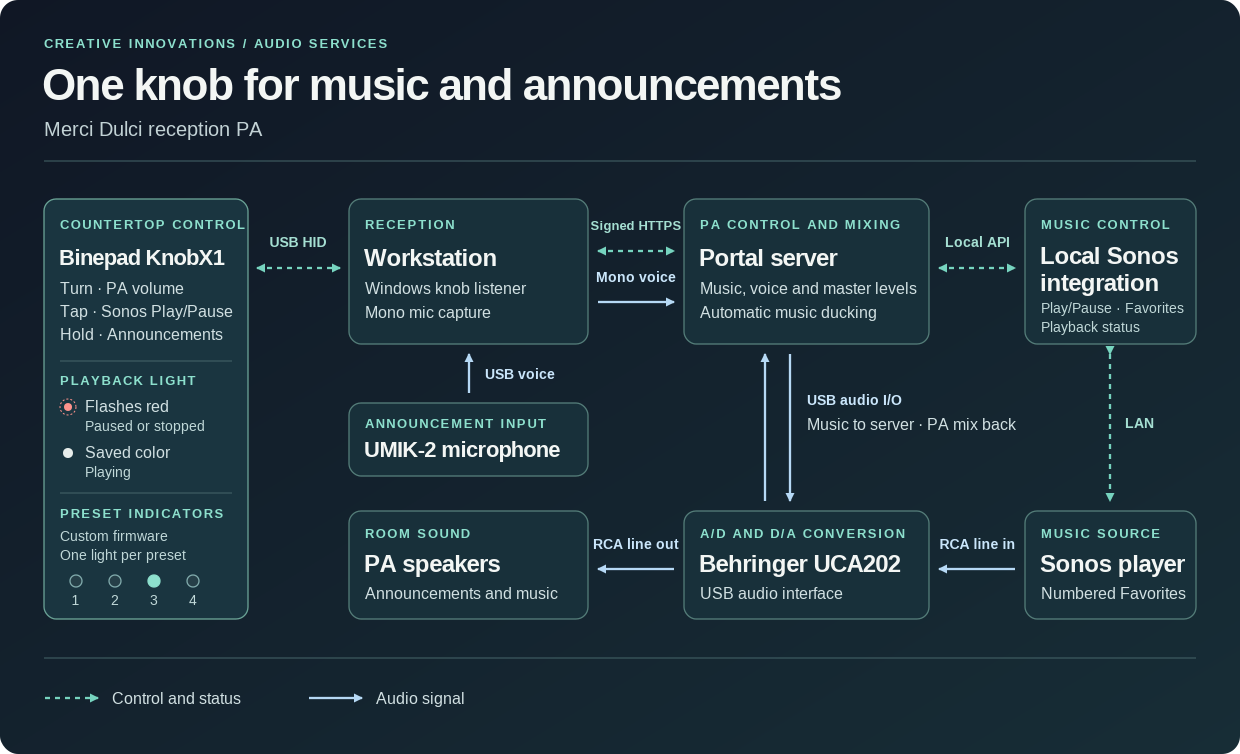
A center tap pauses Sonos while it is playing or starts the current source when paused or stopped. The knob flashes red when paused or stopped and shows its saved color while playing. Holding the center turns on the announcement microphone until release. The separate mode button selects one of four Favorites, each with its own preset indicator. The Binepad KnobX1 and UMIK-2 USB microphone connect to the Windows Reception workstation. The workstation sends signed control commands and mono microphone audio to the portal server over the local network. The portal sends Play/Pause and Favorite commands to the Sonos player and reads playback status through a local integration. Separately, the Sonos player's analog RCA output feeds the Behringer UCA202 audio interface. The interface converts the music to digital audio and sends it to the portal server over USB. The server combines the music and announcement, lowering the music during speech. The UCA202 converts the resulting PA feed back to analog and sends it to the speakers through its RCA outputs. Dashed arrows show control and status. Solid arrows show audio signal direction.
Our property work focuses on the details that support a well-run Airbnb rental and a better guest experience.
04Custom ESP development+
Purpose-built ESP32 hardware and firmware for specialized control, connectivity, and integration challenges.
Project / Audio control
An iPhone control bridge for a network-only JBL subwoofer
The JBL SRX828SP supports remote control over Ethernet through HiQnet, but making routine adjustments on site normally requires additional network hardware and JBL’s iPad software. A purpose-built ESP32-S3 bridge connects directly to the speaker and makes those controls available in a dedicated iPhone app over Bluetooth LE.
The app provides bidirectional control of gain, mute, delay, 0°/180° phase, and available factory and user presets. It also reports amplifier clipping, speaker connection status, and the current settings retrieved from the subwoofer.
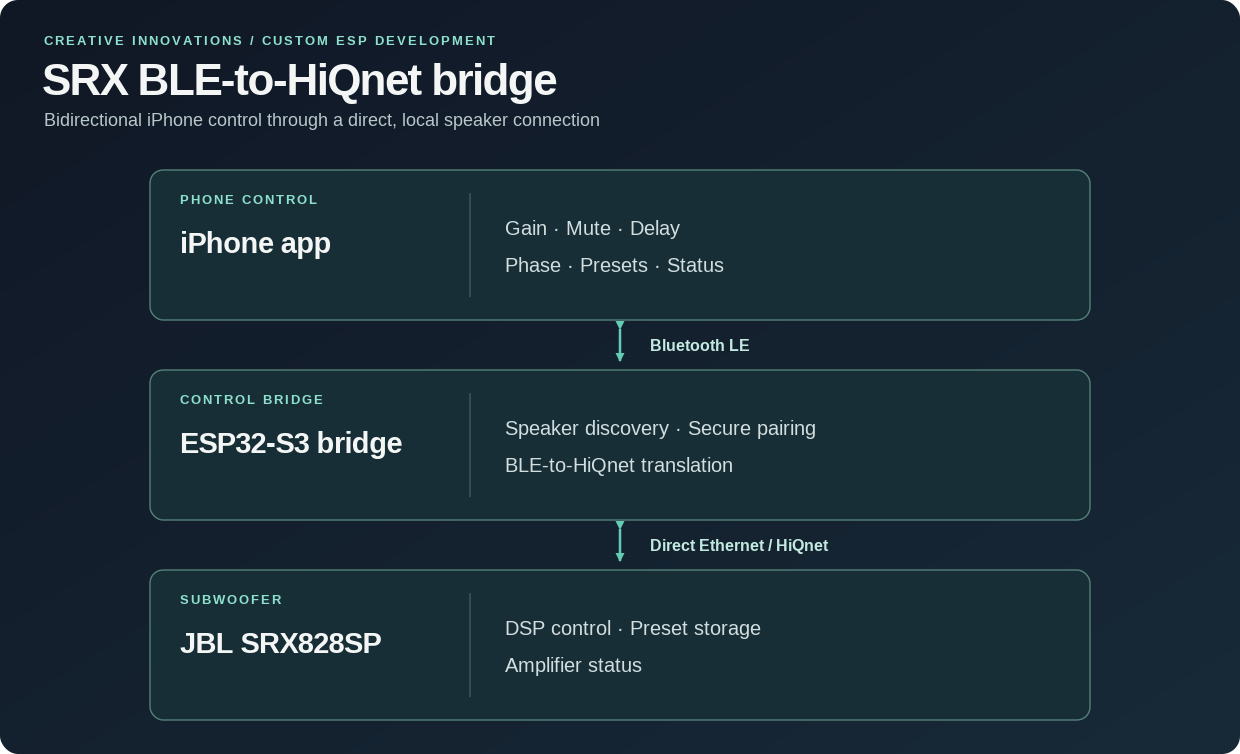
A dedicated iPhone app communicates with the ESP32-S3 bridge over Bluetooth LE. The bridge discovers the connected JBL SRX828SP, opens a HiQnet session over a direct Ethernet cable, and retrieves the speaker’s current settings. Commands and status updates travel in both directions, allowing changes made from the app—or at the speaker—to remain synchronized without a router or venue-wide control network.
Project / Connected hospitality
A dedicated timeclock, using the badges staff already carry
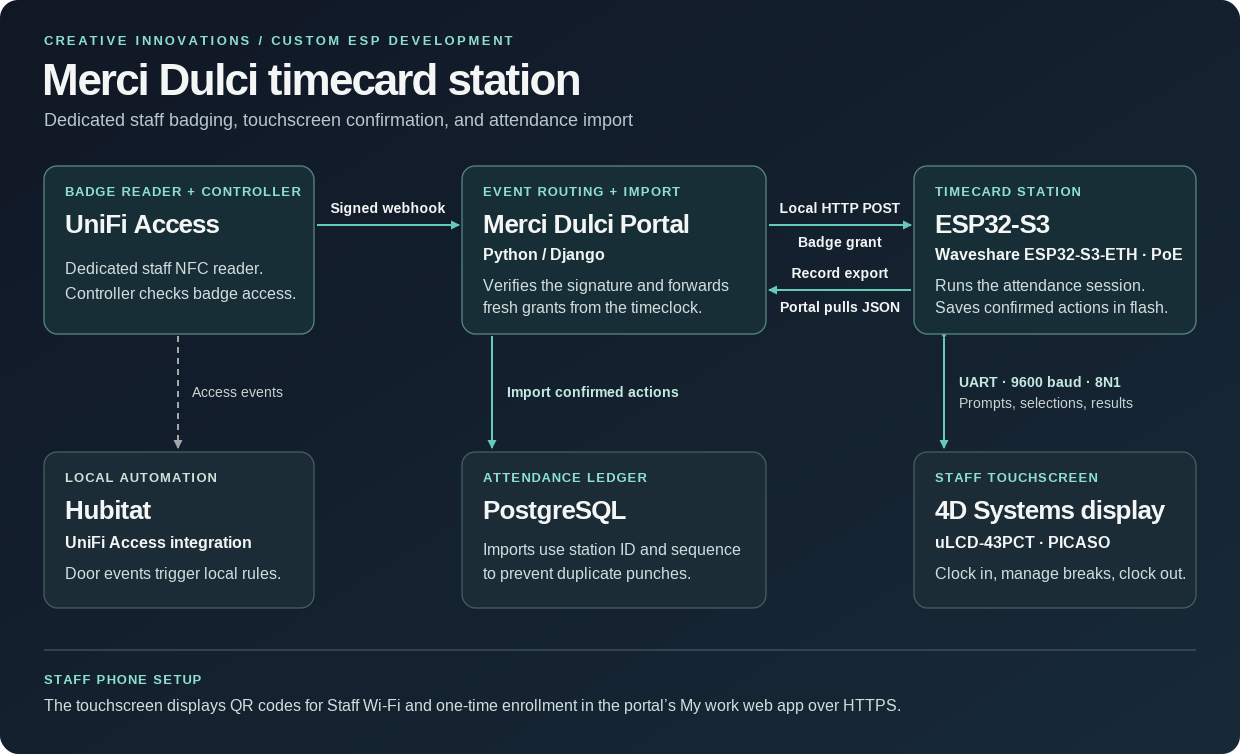
At Merci Dulci, a staff badge tap opens a session on a 4D Systems touchscreen. The employee chooses whether to clock in, take a break, or clock out. The custom ESP32-S3 firmware saves each confirmed action to flash before displaying success. The Django portal pulls those records into PostgreSQL and prevents duplicate punches on repeat imports.
The same station also displays QR codes for joining Staff Wi-Fi and linking a phone to the hotel’s My work app.
A UniFi Access badge reader sends a signed event to the Merci Dulci Django portal. The portal passes a badge grant to the Waveshare ESP32-S3-ETH station. A 4D Systems touchscreen connects to the station over UART for prompts, selections, and results. The ESP32 saves confirmed actions in flash; the portal pulls them into PostgreSQL and prevents duplicate punches. A separate UniFi Access event feed supports local door automation through Hubitat. The station also displays QR codes for Staff Wi-Fi and the My work app.
Project / Live entertainment
A karaoke booth sign that follows the singer queue
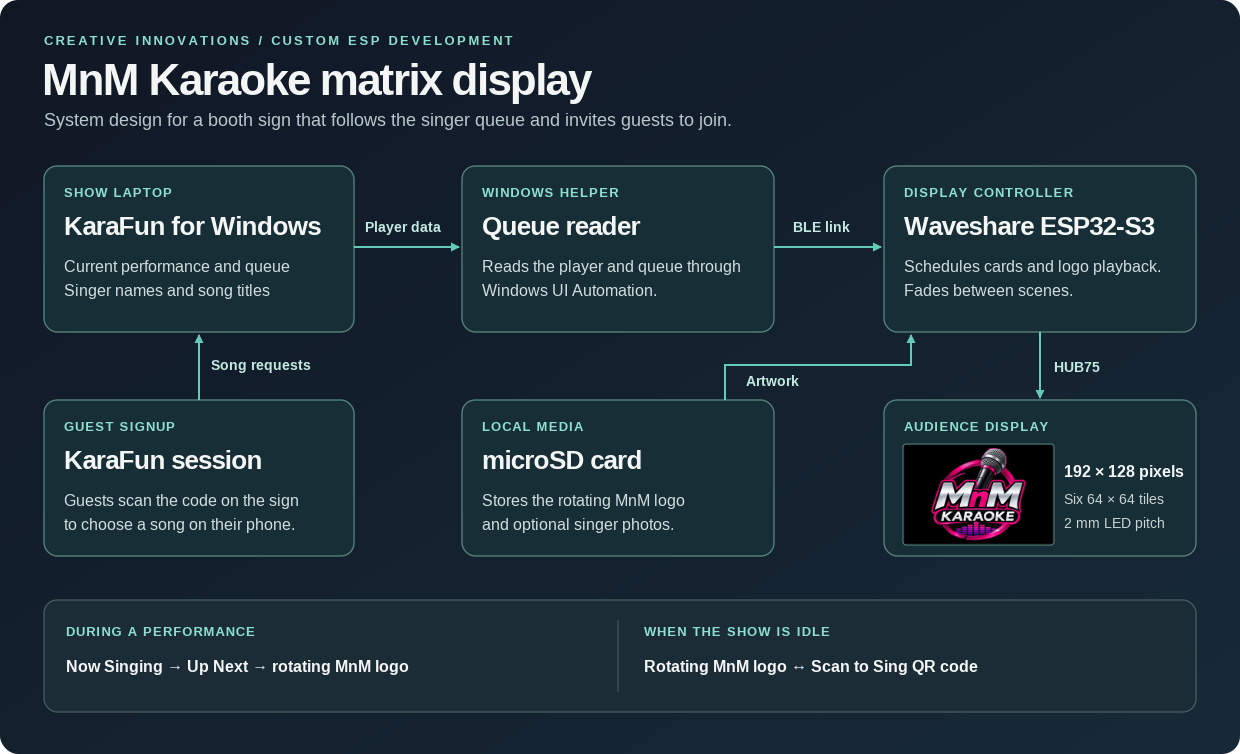
A Windows helper reads the current singer and song from KaraFun, then sends updates over Bluetooth LE to a six-panel LED sign. The sign cycles through Now Singing, Up Next, and a rotating MnM logo. When the show is idle, guests can scan a QR code to request a song.
A Windows helper reads the current KaraFun performance and singer queue. It sends singer names and song titles over Bluetooth LE to a Waveshare ESP32-S3. The controller drives six LED panels and reads the rotating MnM logo from a microSD card. During a performance, the sign cycles through Now Singing, Up Next, and the logo. When the queue is idle, it alternates the logo with a QR code for guests to request a song.
How we think
Connected systems should be easy to live with.
Local where practical
Favor direct connections and make cloud dependencies clear.
Essential controls stay usable
Plan for independent controls when a network or integration is unavailable.
Clear when something fails
Design for visible system status and useful troubleshooting, not silent failures.
Case study / Connected hospitality
One stay. Many connected moments.
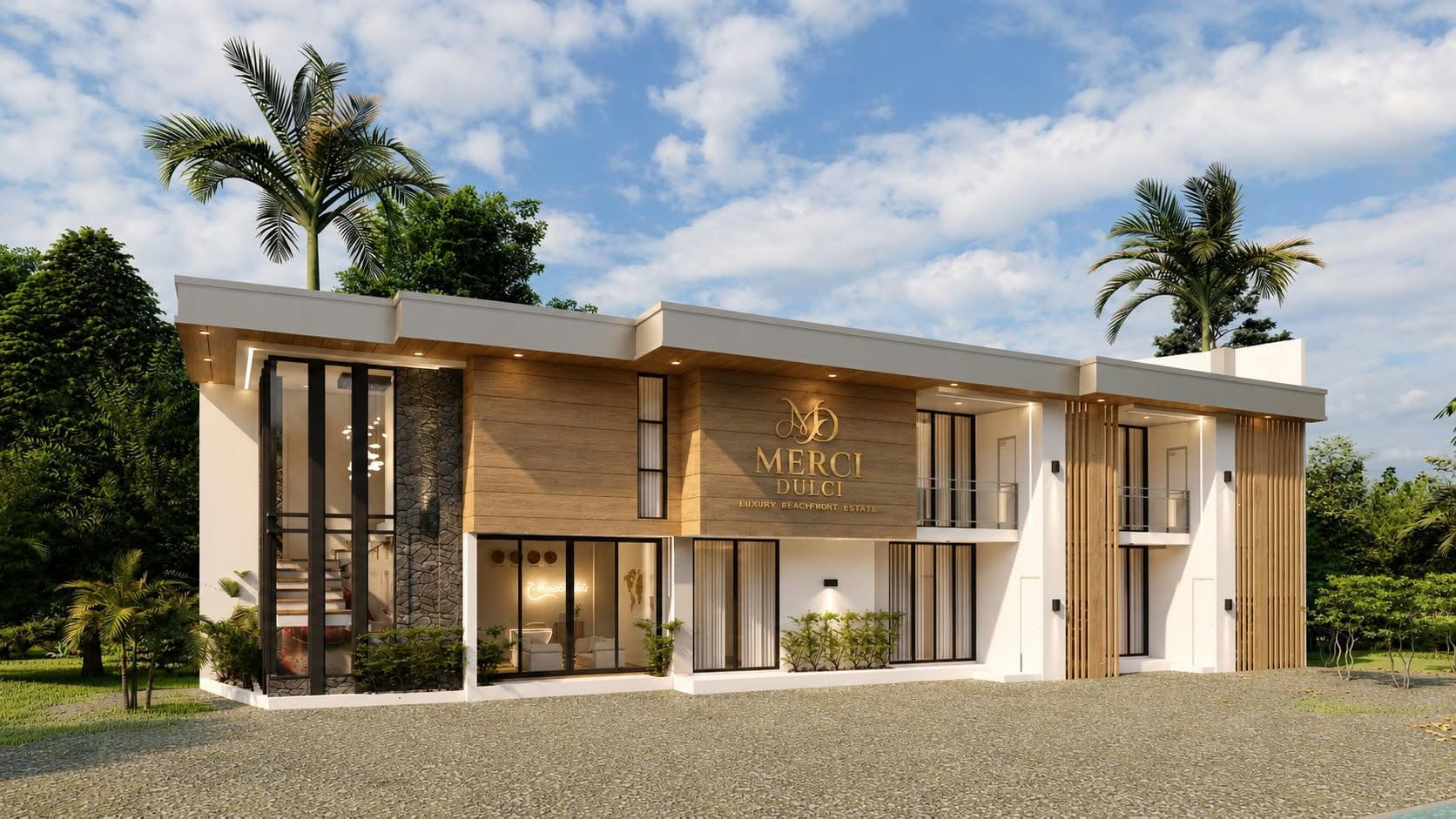
For Merci Dulci, a four-room beachfront property in Panglao, Bohol, we designed clear workflows for guest arrival, staff response, and reception operations.
The SRX BLE-to-HiQnet bridge is a custom ESP32-S3 prototype that connects an iPhone app to a JBL SRX828SP subwoofer through Bluetooth LE and a direct Ethernet link.
On site, the app puts gain, mute, delay, 0°/180° phase, and available preset recall in your hand. It also shows amplifier clipping and connection status. The bridge handles HiQnet over its direct cable, without requiring JBL’s iPad app or a venue-wide control network.
It’s a lot of sub for the money. The bridge adds practical local control for smaller DJ rigs, bands, and event setups that don’t call for a full networked control system.
iPhone app↔ESP32-S3 + W5500↔JBL SRX828SPCustom BLE control · Direct Ethernet · HiQnet
Prototype project. Creative Innovations LLC is not affiliated with or endorsed by JBL.
04 / Contact
Have something in mind?
Tell us what you’re working on and which part of Creative Innovations fits your needs.